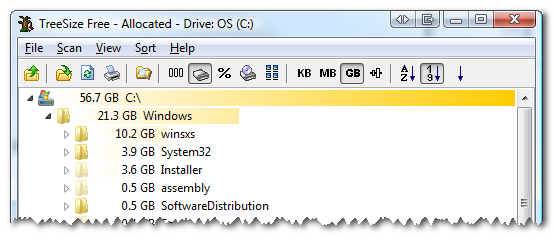
I’ve read all about WinSXS (Side by Side) and how it tries to solve the DLL Hell problems that have plagued Windows for ages, but I thought it was ridiculous that this folder was taking up over 10 gigs of precious space on my 64 GB solid state drive. A few months back, I replaced my laptop’s optical drive with a 500 gig HDD to try to move some of my media and documents over. However, when I went to install the latest service pack to Visual Studio today, I noticed I didn’t have enough space to install it. I used a simple tool called TreeSize Free to analyze the disk space and see what was taking up all the room. A quick drill down of the largest item showed that the WinSXS folder was talking up 10.2 GB of space.
Some research showed that if you have Windows Vista SP1 installed, there is a tool called VSP1CLN.exe in the C:\Windows\System32 folder which can be used to clean up the old (pre SP1) files to regain some space. The downside to this is you won’t be able to uninstall SP1, so you should make sure the system is running stable with SP1 before running the tool. I looked for this file, but quickly realized that it could not be found! It turns out this was because I don’t have Vista SP1 installed (I actually have SP2 installed). If you have SP1 installed, you can use the VSP1CLN file in place of COMPCLN in the directions below.
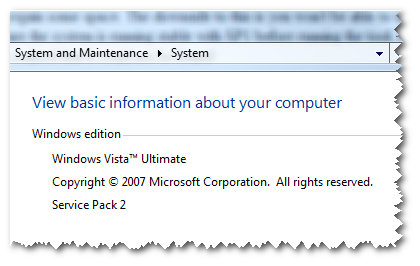
You can check your Service Pack version by looking at your computer properties: click Start, then right clicking on Computer and clicking Properties. This showed I was running Windows Vista Service Pack 2:
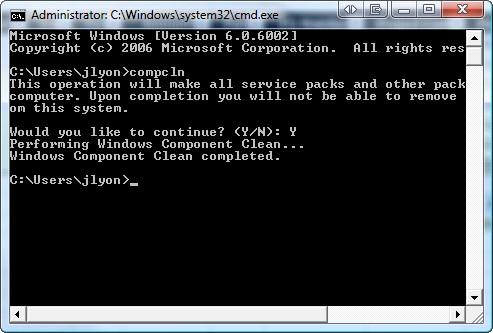
A bit more research later and I found that Vista SP2 has a similar Service Pack Cleanup Tool in the same C:\Windows\System32 directory called COMPCLN.exe. You can start the program by using the following instructions:
- Click Start > Run
- Type in CMD and press [enter]
- At the command prompt, type COMPCLN and press [enter]
- Press Y when prompted to continue
(the application will now start cleaning up the old files)
The size of the WinSXS folder (and potentially others?) should now have been reduced. On my computer, I found that the WinSXS folder was only reduced by 1 GB, but others have seen 3-4 GB reductions.


Leave a Reply