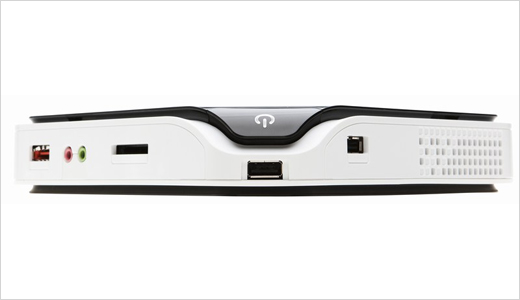
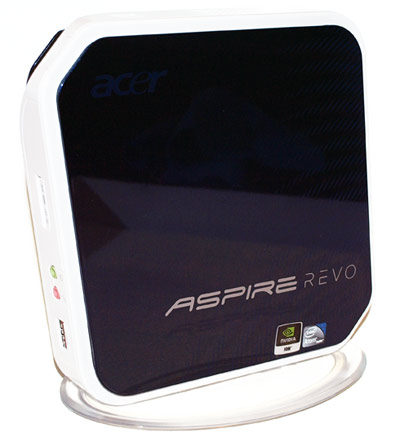
While browsing newegg the other day, I saw a nifty little gadget called a ‘nettop’ by the name of ‘Revo’. A nettop is essentially the desktop version of it’s cousin, the netbook. Similar to the netbook, the nettop is designed with lower power consumption, small footprint, and low cost in mind. Surprisingly, the Revo nettop (or Acer Aspire Revo AR-1600 as it’s formally known as) makes a decent Home Theater PC (HTPC).
**If you are just interested in figuring out how to setup the Revo for XBMC, skip down to the How To section.
***If you are looking for details on IR Server and how it helps with XBMC on Windows, check the XBMC for Windows IR Fix
Backhistory / Learning
I saw some reviews for the Revo on newegg where people had mentioned that they were running media center software (XBMC) on the device like a champ and it was playing 1080p High Definition content perfectly. I was really surprised to hear this since the Revo only has a small Intel Atom processor in it and the whole device consumes less than 30W of power. While the low processing power would typically mean this device is out of the question for high definition content (a similar downfall of the original Xbox 1 for which XBMC was developed), the Revo has something special up it’s sleeve: the Ion GPU.
 The Ion GPU is a new (to me at least) technology from nVidia which can do hardware accelerated decoding of high-definition video. Typically, the media player software has to do software decoding of the video feed which requires a fairly powerful processor for decoding high defintion feeds. But because the Revo has the Ion chip it doesn’t need a strong processor and it can offload the video decoding via hardware acceleration onto the Ion chip.
This requires one major thing though – the software you are using you watch your video files must support hardware accelerated video processing. Luckily, the XBMC Live (bootable) distribution has VDPAU as one of the video decoding methods. To test this concept out, I loaded up XBMC Live onto a thumb drive and some high definition videos onto another drive then headed into my local big box retailer to try it out. Sure enough, when I plugged in the XBMC drive and rebooted the revo it booted up to the splash screen for XBMC.
I double checked the VDPAU was selected then tried out some of my video clips. The non HD video clips and audio all played fine out of the box (after a change of the audio setting to “plug:hdmi”), but the real challenge was going to be some HD content. I opened up a 720p file I had on the second thumb drive and I was surprised to see that the video start playing with no hesitation. I checked the onboard stats of XBMC (via an ‘O’ keypress) and noted that the CPU utilization was very low (10-20%) which indicated that the Ion chip was doing it’s job.
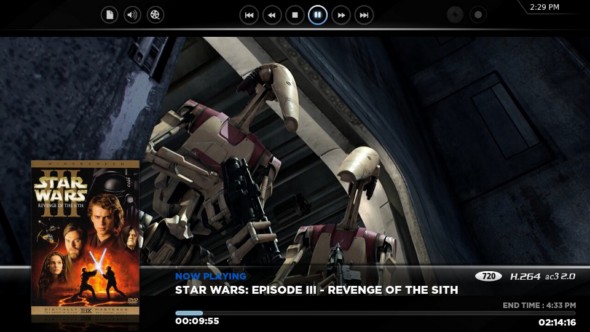
Take a look at the above screenshot showing Star Wars playing in 720p. The screenshot was borrowed from the XBMC Skins gallery and shows the ‘info’ option that can be pressed while watching a movie. The bottom part of the screen shows the traditional information such as time elapsed and remaining as well as some quick information about the movie such as resolution and movie-poster. Along the top of the screen you can see the options to control the playback of the movie as well as quick-buttons to adjust audio/video settings while the movie is playing.
The real test was 1080p content… which sadly the revo failed at. The statistics in XBMC showed that the CPU utilization was low, but for some reason the KILLA video clip was somewhat choppy.
What next?
After doing some more research, I’ve found a number of people saying a second stick of ram is required for VDPAU to fully work properly. Some people say this is because it lets you select 512MB of ram for the video chip whereas others say it’s because VDPAU requires dual-channel memory to run properly. I ordered a stick of memory and will post another update when I get it installed to see if it makes a difference on the 1080p content. Update: The 1GB of memory fixes the 1080p video stutter issue.
The Bottom Line
The bottom line is the revo quickly and easily stands itself up as a great (cheap) device for creating and easy and quick media player. It works great with all content up to and including 720p content, but does not work with 1080p content out of the box. Update: Adding 1GB of memory and adjusting video memory to 512MB makes 1080p work.
Also
I should also note that the Revo comes with a 160 gig hard drive and Windows XP out of the box. It has an HDMI and VGA port, but does not have optical out (which doesn’t matter if you have a modern surround receiver). I installed Windows 7 under the stock configuration and XBMC for Windows runs easily under that (and the base XP installation). In a separate thread, I’ll shed some light on how to get HD content running in windows using MPC-HC and it’s hardware offloading technology.
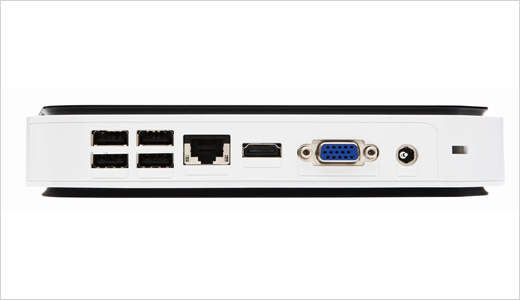
- Revo AR-1600: Acer Aspire Revo AR1600-U910H
- 1GB Memory: Rendition by Crucial 200-Pin DDR2 SO-DIMM DDR2 800 (PC2 6400) Laptop Memory
- IR Sensor and Remote: AVS Gear HA-IR01SV Infrared Certified MCE VISTA Remote Control
- 1GB+ Flash Drive: USB Flash Drives on Newegg
How to Install
In this section, I’ll cover some of the details necessary to install XBMC Live directly on the Revo. It’s a short checklist now, but feel free to ask for details in the comments and I can add some updates. Also note that the XBMC 9.11 installer can keep your existing XP installation (just choose the repartition option when walking through the XBMC installer).
Software Required:
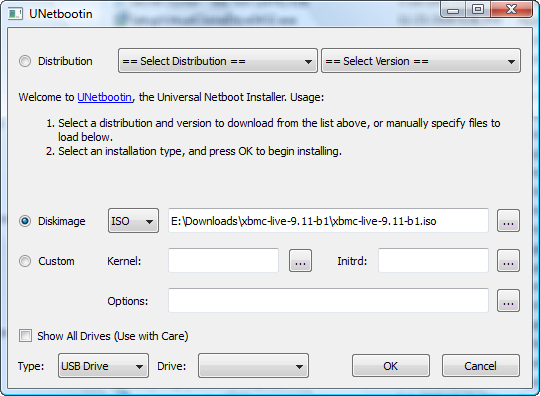
- Unetbootin – ‘moves’ the ISO onto the Flash Drive
- XBMC Live ISO – Camelot 9.11 repack (check XMBC.org for the latest)
Installing to the USB Flash Drive
- Open Unetbootin and select the Diskimage button
- Click the … to the right of Diskimage and select the 9.11b iso
- Select your thumb drive from the “Drive” selector
- Click OK (and let the system extract the files to the thumb drive and make it bootable)
- When it’s complete, there is no need to reboot the system – just close out Unetbootin
- [Optional] Only for 9.04 and older: open the syslinux.cfg file and replace all instances of “boot=cd” with “boot=usb”. This is not necessary for the 9.11 versions.
- [Optional] If you don’t want to select the NVIDIA option every time, open the syslinux.cfg and replace the details in the “default” section with the details from the NVIDIA section. This will make it so the thumb drive will by default boot into the NVIDIA mode. Note: if you are not doing this for the REVO or another NVIDIA based system, skip this step.
Setting up the Revo (BIOS):
At this point, you should have a fully bootable USB flash drive with XBMC on it. You can take this to any computer and plug it in.
- Plug the USB Flash Drive into the revo and restart the Revo.
- Hit “Del” at boot up.
- Go to the Advanced section and make sure the iGPU memory setting is set to Manual with 512MB selected (only 256 will be available if you didn’t install the second memory chip yet)
- Optional: Change the boot priority so the thumb drive is first (above the built-in HDD)
Configuring XBMC:
At this point, the Revo should be setup to boot into XBMC with the appropriate amount of graphics memory available for the HD content to play. If you didn’t do the optional step of changing the boot order, you will need to press F12 to get into the boot menu and select your thumb drive from the list. If you did make the boot priority change then the revo should just boot right into XBMC (after going to the XBMC loader menu).
Let’s update the XBMC configuration to be optimized. Once you are booted into XBMC:
- Go down to the System menu item and press right, then click on the settings option
- Go down to the System item and select it.
- Go to the audio output section and change the output to Custom and enter “plug:hdmi” as the output type


Leave a Reply