| How To Reduce Size of WinSXS |
| Written by Josh Lyon | |||
| Monday, 04 January 2010 10:56 | |||
|
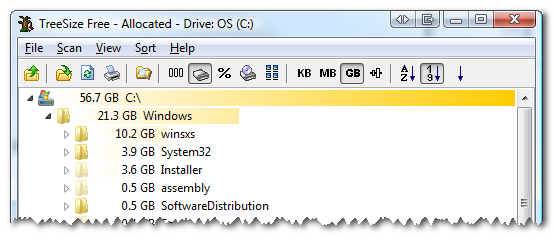
I've read all about WinSXS (Side by Side) and how it tries to solve the DLL Hell problems that have plagued Windows for ages, but I thought it was ridiculous that this folder was taking up over 10 gigs of precious space on my 64 GB solid state drive. A few months back, I replaced my laptop's optical drive with a 500 gig HDD to try to move some of my media and documents over. However, when I went to install the latest service pack to Visual Studio today, I noticed I didn't have enough space to install it. I used a simple tool called TreeSize Free to analyze the disk space and see what was taking up all the room. A quick drill down of the largest item showed that the WinSXS folder was talking up 10.2 GB of space.
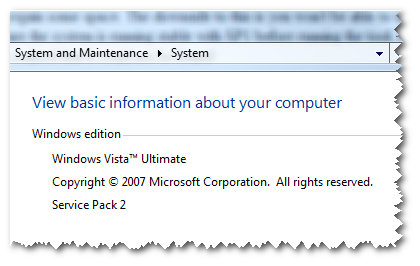
Some research showed that if you have Windows Vista SP1 installed, there is a tool called VSP1CLN.exe in the C:\Windows\System32 folder which can be used to clean up the old (pre SP1) files to regain some space. The downside to this is you won't be able to uninstall SP1, so you should make sure the system is running stable with SP1 before running the tool. I looked for this file, but quickly realized that it could not be found! It turns out this was because I don't have Vista SP1 installed (I actually have SP2 installed). If you have SP1 installed, you can use the VSP1CLN file in place of COMPCLN in the directions below. You can check your Service Pack version by looking at your computer properties: click Start, then right clicking on Computer and clicking Properties. This showed I was running Windows Vista Service Pack 2:
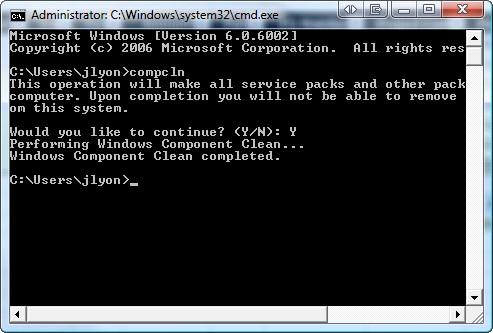
A bit more research later and I found that Vista SP2 has a similar Service Pack Cleanup Tool in the same C:\Windows\System32 directory called COMPCLN.exe. You can start the program by using the following instructions:
The size of the WinSXS folder (and potentially others?) should now have been reduced. On my computer, I found that the WinSXS folder was only reduced by 1 GB, but others have seen 3-4 GB reductions.
Bookmark
Email This
Hits: 144426 Comments (48)Thanks for the Feedback
Thanks for the comments! I'm glad to see that this has helped others and it's really interesting to see how much space it has saved for the different people (400 MB, 1 GB, 1.9 GB).
...
My file was at a whopping 17.9 GB; this knocked it down to 16.2. That will be at least somewhat helpful - thanks!
Win7 and 2008
@amgadelsaeigh: Thanks for the heads up on this not being applicable to Windows 7
@Ernesto: I haven't tested this on Windows 2008... you can always try it and let the rest of us know though! corrections
@Cal:
it's normal for the size discrepancy if your files are compressed. decompress your C: drive and watch your speed increase! @Mustafa: i believe you are confused...defrag merely reorganizes files, not delete... I saved a lot of space
Great, concise article. I saved about 3GB this way which I needed badly! Thanks Josh!
of course not in win 7
Of course this does not (yet) exist in Windows 7 or Windows 2008 R2. A service pack has yet to be released for those operating systems !
RE: Ixul
Windows SxS is used for more than just full-on service packs. As different libraries are installed or upgraded the SxS folder serves as an assembly cache for previous versions of the libraries. This means this could also apply to other 'minor' updates like security patches or even other updates (vendor/software).
Found How to Reduce Size of Winsxs in WIN7
Hi I Found How It Works In WIN7
1.Open My Computer, 2.Right Click on The Windows System Drive and Click on Properties 3.Then From The Properties Dialog Click On "DisK Cleanup" in General Tab. 4.Wait for a while to Open The "DisK Cleanup" Dialog. 5.Now Here it has a Option On Lower Left "Clean up system files".Click on it. 6."DisK Cleanup" Dialog will Re-Open. Now you will find "Service File Backup Files" in "Files to Delete" Box. Just Tick It Out and click Ok. 7.A Conformation Pop-Up Will Open, Click "Delete Files" to Proceed. 8.Its All Done. ![]() cheap computers
I really believe this step involving the size of this folder in windows vista to be a step backwards for Microsoft. How does a department go about creating and deploying windows 3rd party images to PC's from a 20 GB Windows install with MS Office, I cannot believe MS took this route. ( Well it can be done but what a waste of time and disk space.)
...
thanks for this information...i knocked the size of my winsxs folder down from 10.1gb to 8.2gb..im well chuffed...thanks again x x
Thanks
Thanks - used this and got back over 3Gb (running SP2)
Now how do I get rid of all those dll's that go with old versions of applications or applications that I have since uninstalled??? :-) THinks, hunt for *.dll with a last access date of ??? ...
Thanks so lottttt!
Got back 2.9GB from 22.8GB to 19.9GB out of my SSD 64GB Toshiba (Vista SP1) highy recommended! a shade under 2GB
Went from 19.4GB down to 17.6GB... pretty sad that just a base install (Vista x64) with a small mixture of software uses up almost the entire space of an 80GB drive.
Thanks so much
I found 2gigs of queued error reporting and will everything else i saved 5 gigs, thanks alot
Quote " We desperately need competitive alternative to the Windows Totalitarian monarchy. "
I noticed a users comment "We desperately need competitive alternative to the Windows Totalitarian monarchy.". Solution: It's called Linux.
Thanks for harming others
Well done, Josh. With this tool, some have found a way to save some space on their hard drives.
They've also made their PCs less reliable. Windows needs the WinSxS folder to keep software running despite requiring different DLLs by the same name. The AWA (Anti-Windows Alliance) Windows Server 2008 R2
My C drive doees not have a clan up button...and compcln is also not found, did any one done this onb windows 2008 R2?
best article to me
The numerous designs in addition to models intended for Ice wristwatches make fun available options to the many who can opt for a watch in line with their desires and prerequisites. The impressive choice of Ice watches provde the exquisite appeal and one of a kind designs which might be unrivaled from the watch marketplace. One of the most extremely famous and successful models connected with Ice wristwatches is it is unisex went up collection check out. This watch incorporates a white dial and light solid event with eye-catching and vibrant features. The wide variety and attractiveness of The rocks watches cause them to perfect for virtually every wrist and will automatically be current in fashion for quite a while to come together with being at affordable charges. Ice delivers watches which might be innovative in addition to unique having models which might be simple still, give correct functionality and this also has manufactured these watches get to be the must include accessories in this year. The capability that packages Ice watches apart from the rest is their own design idea that orbits around blending the revolutionary with this old, such as taking a old tasteful designs in addition to styling these individuals up when using the contemporary choice of hues in addition to tints, metals in addition to plastics - this can be the signature glimpse of The rocks Watches.
Write comment
|


. I have reduced around 1GB. this is great ideas.